
ABC Games for Kids - ABC Jump
Cubic Frog® Apps-Learning Games for KidsEducational
4.33.00 Reviews
- Version
- 1.4
- Installs
- 10.00K
- Age Rating
- Everyone
Screenshots
Our Review of ABC Games for Kids - ABC Jump
 Analysis by Appyee
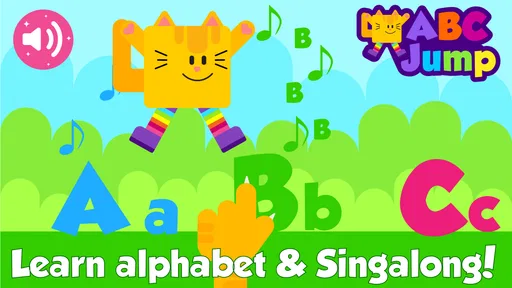
ABC Jump is the kind of children’s game I would open when a young learner needs a short, friendly way to revisit letters rather than sit through a formal lesson. It combines alphabet practice with flash cards, tracing, spelling, and phonics activities, giving the experience a more playful shape than a plain worksheet. I found the strongest appeal in that mix: children can move between recognizing a letter, hearing how it works, and trying to reproduce it instead of meeting the alphabet through only one exercise.
That flexibility matters because early learners do not all struggle with the same thing. One child may recognize a capital letter but hesitate when asked for its sound. Another may know the sound but need more practice forming the character. ABC Jump is built around those connected steps, so it feels more useful than a simple alphabet poster or a collection of disconnected mini-games. I would still treat it as a practice companion, not a complete reading course, but it has a clear place in a child’s everyday routine.
My first impression of ABC Jump
The game comes from Cubic Frog® Apps-Learning Games for Kids, a developer focused on learning experiences for children. It is listed as an educational game for Everyone, which matches the gentle, introductory purpose I experienced. The free entry point makes it easy for a parent or teacher to try before deciding whether the available activities suit a particular child. There are also in-app purchases ranging from $5.99 to $29.99 per item, so I would check what is accessible at no cost before building a regular routine around it.
At first glance, the most convincing part is the way the activities are connected by a single subject: the alphabet. Flash cards support recognition, tracing adds a physical or visual practice step, and spelling and phonics move the child toward using letters rather than merely naming them. That progression gives the game a more coherent educational purpose than an app that simply rewards tapping colorful objects.
The presentation is clearly aimed at keeping the experience approachable. I would not expect a dense classroom interface here, and that is a benefit for a child who is still learning how to navigate digital activities. The game’s overall mood is light and inviting, which lowers the barrier to starting a session. For a parent, that can be more valuable than an impressive amount of content if the child is willing to return and practice.
The game has an average rating of 4.3 from around 130 ratings, and it has passed 10K+ installs. Those figures suggest that it has found a modest audience, although I would not use them as a substitute for watching how a particular child responds. Early learning depends heavily on age, language background, attention span, and whether the child enjoys repeating the same kind of task.
A useful way to begin with a young learner
I would avoid handing over the device with no context and expecting the game to teach everything automatically. A better first session is short and collaborative: sit beside the child, let them choose an activity, and ask them to say the letter or sound aloud before moving on. This turns the screen into a prompt for conversation. The adult can notice whether the real difficulty is recognition, pronunciation, or tracing, then steer the next session toward that need.
One practical routine is to use flash cards for a quick warm-up, tracing when the child is still engaged, and phonics or spelling only after the basic letter work feels comfortable. That order prevents the more demanding tasks from feeling like a sudden test. I also like the idea of ending before frustration appears. A short successful session is more likely to create a positive habit than a long attempt to complete every available activity.
The free format is especially useful for this trial period. Parents can see whether the art style, pace, and activity structure hold a child’s attention before considering paid content. I would make that decision based on repeated use, not on one enthusiastic first session. Children often enjoy a new game briefly, while genuine educational value shows up when they can return to it without needing constant adult prompting.
How the game communicates its learning world
ABC Jump does not need a complicated story world to make its subject understandable. Its setting is the alphabet itself, and the visual language works best when it keeps attention on letters, examples, and the child’s response. That focus is important: an educational game can become less effective when decorative characters or busy backgrounds compete with the symbol the learner is supposed to remember.
I read the art direction as cheerful rather than dramatic. The mood supports exploration without making the child feel as though every mistake is a failure. That is a good fit for pre-reading practice, where repetition is essential and confidence can disappear quickly. The game feels most coherent when its playful treatment encourages another attempt while the mechanics continue to ask for a real recognition or writing step.
There is also a useful distinction between visual excitement and visual noise. For a beginner, a letter should remain the main object of attention. When using the game with a child who is easily distracted, I would keep the device close, reduce surrounding distractions, and talk about one target at a time: “What letter is this?” followed by “What sound does it make?” That simple habit helps turn the game’s visual presentation into deliberate learning rather than passive watching.
The flash-card approach is particularly helpful for parents who want to observe progress informally. Instead of asking whether the child “finished” a level, I would look for signs such as faster recognition, fewer guesses, or a growing ability to connect a letter with its sound. Those are more meaningful outcomes than moving quickly through screens. The game supplies the prompt, but the adult’s questions can make the learning more active.
Where the visual approach works, and where it may not
The friendly presentation should suit children who need encouragement, but it may feel too gentle for learners who already know the alphabet and want a deeper challenge. A child who can confidently identify letters, produce common sounds, and spell simple words may outgrow the introductory focus. In that case, a phonics curriculum, a handwriting workbook, or a reading app with structured word progression could be a better next step.
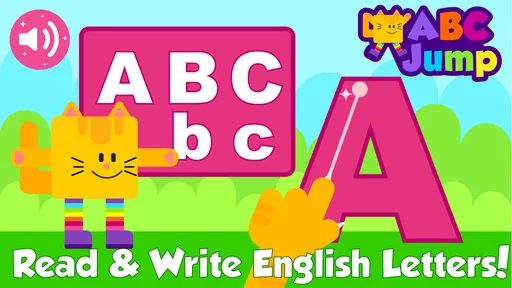
I would also be careful with the difference between tracing on a screen and writing on paper. Screen tracing can help with direction and familiarity, but it does not fully replace pencil control, pressure, spacing, or the tactile feedback of a real page. My preferred approach would be to use tracing as a bridge: practice a letter digitally, then ask the child to write the same letter on paper or in a tray of sand. That two-part workflow is one of the easiest ways to get more value from the game.
Another useful adjustment is to separate recognition from performance. If a child taps the right answer by guessing, I would pause and ask them to name the letter before continuing. If they struggle, I would model the sound without turning the moment into a correction-heavy drill. The game’s visual world works best when it opens a conversation rather than replacing one.
Sound, rhythm, and the feel of a session
Alphabet learning depends on sound as much as appearance, so the phonics side gives ABC Jump an important role beyond visual matching. The game’s rhythm is most effective when each activity has a clear beginning, response, and result. That structure helps a young child understand what to do next, while repeated exposure gives the letter-sound connection time to settle.
I would use sound actively rather than letting it run in the background. When a letter appears, I would encourage the child to repeat its name or sound, then compare it with a word they already know. This is especially useful for children who can memorize visual shapes but have not yet connected them to spoken language. The game can prompt the exercise, but the child’s voice is what makes the practice more memorable.
The pacing also affects mood. A fast sequence can feel exciting, but speed is not automatically progress for a beginner. If the child is rushing through taps, I would slow the session down and ask for a spoken answer before the next interaction. Conversely, if the child is losing interest during repeated recognition, moving to tracing or a spelling activity can refresh the rhythm without abandoning the alphabet theme.
This is where ABC Jump compares well with a static alphabet video. A video can model sounds and letters, but the child mainly watches. Here, the combination of prompts and activities gives the learner more opportunities to respond. It is still less comprehensive than working with an adult or following a full literacy program, yet it offers more active participation than passive screen time.
Making sound practice useful at home
A realistic everyday scenario would be a few minutes after breakfast, before the child moves on to another activity. I would choose a small group of letters, listen to the phonics prompt, and ask the child to find those letters later in a picture book, food package, or sign. The point is not to turn the morning into a lesson; it is to connect the game’s sound practice with the printed world around the child.
For a child learning English as an additional language, I would add extra care. Letter names and sounds may not map neatly onto the child’s first language, and pronunciation can require more explanation than the app alone provides. In that situation, the game can be a useful visual and listening aid, but an adult should model the sound and explain unfamiliar example words. A bilingual child may also benefit from practicing one language at a time so the session has a clear target.
Headphones are not essential to the learning strategy. In fact, I prefer shared listening when possible because it lets me hear whether the child is repeating the sound accurately and whether the audio is helping or distracting. A parent who needs a quieter environment can use headphones, but should still check in regularly rather than treating the game as an unattended lesson.
Do the mechanics fit the educational goal?
The central strength is the relationship between the mechanics and the subject. Flash cards ask for recognition, tracing asks for controlled reproduction, spelling asks for ordering or recalling letters, and phonics asks the child to connect symbols with speech. Those are not identical skills, so the variety gives parents several ways to revisit the same alphabet knowledge without repeating one screen endlessly.
The trade-off is that variety can make it harder to tell which skill needs attention unless an adult watches. If a child succeeds at flash cards but struggles with tracing, the solution is not simply more of every activity. I would give extra time to the weaker area and use the stronger one as a confidence-building warm-up. This makes the game more like a flexible practice tool than a fixed course.
Tracing deserves realistic expectations. A child may follow a guide successfully while still having trouble forming the letter independently. After a tracing activity, I would hide the on-screen model and ask the child to draw the letter from memory, first with help and then alone. That small check reveals whether the activity is building recall or only short-term hand movement.
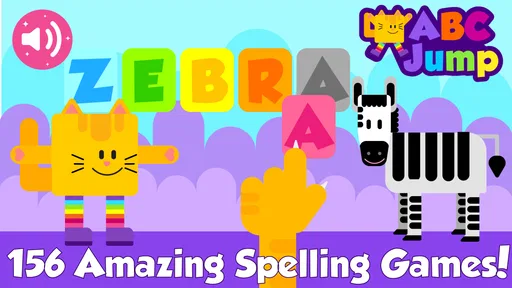
Spelling can also be approached in two ways. If the child is very young, I would treat it as a recognition exercise and celebrate noticing the correct sequence. For a more advanced learner, I would ask them to say the word slowly and identify the sounds before selecting letters. That extra spoken step prevents the activity from becoming a visual puzzle with no connection to actual reading.
Compared with paper flash cards, the game offers more variation and immediate interaction, but paper is easier to customize and use away from a screen. Compared with a handwriting workbook, the game is more inviting at the start, while paper provides better physical writing practice. Compared with a full phonics program, ABC Jump appears more suitable for short reinforcement than for a complete, carefully sequenced literacy path. I would choose it as one part of a routine, not as the only resource.
Who should use it, and who should choose something else?
I would recommend trying it with preschool and early elementary learners who are beginning alphabet recognition or need extra repetition with sounds and letter formation. It is also a reasonable option for parents looking for a short activity during travel, a quiet transition between tasks, or a simple way to reinforce what a child is practicing elsewhere.
I would be less likely to recommend it as the main tool for a child who needs specialized reading support, detailed handwriting instruction, or a clearly staged curriculum with extensive progress reporting. A teacher, literacy specialist, or structured educational program may be better when the child has persistent difficulty distinguishing sounds, remembering symbols, or blending words. The game can support those efforts, but it should not be expected to diagnose or solve every learning challenge.
The app runs on Android devices from version 4.4 onward, which makes it accessible on older compatible hardware. Its current version is 1.4. I would still test it on the specific device a child will use, especially if the phone or tablet is shared with other family members. More important than technical age is practical comfort: the screen should be large enough for tracing, and the device should be positioned so the child can use it without awkward wrist or neck strain.
The game is free to start, while optional purchases sit between $5.99 and $29.99 per item. That pricing structure means parents should decide what they consider essential before purchasing anything. I would first identify whether the free activities cover the child’s immediate need, then consider paid material only if the child returns consistently and the extra practice clearly fills a gap. This avoids paying for content simply because a child is excited by the first session.
My atmosphere verdict after looking beyond the novelty
ABC Jump creates a coherent mood by keeping its playful presentation tied to recognizable learning actions. The alphabet is not just decoration: the visuals invite identification, the sound work supports phonics, and the activity changes give the session a manageable rhythm. I appreciate that the game can feel light without abandoning the basic mechanics that make early practice worthwhile.
Its best use is modest and regular. I would choose a short session, stay nearby, ask the child to speak as well as tap, and follow digital tracing with real-world writing. I would also rotate between activities based on the child’s actual difficulty instead of trying to complete everything. Those habits turn a pleasant game into a more focused learning routine.
The limitations are equally clear. It will not replace books, paper practice, conversation, or a teacher. Children who are already beyond introductory alphabet work may find the content too basic, while learners who need individualized support require more explanation and feedback than a game can provide. The in-app purchase range also means the free starting point should be evaluated carefully before spending.
Overall, I see ABC Jump as a friendly educational game for building early familiarity with letters, sounds, tracing, and simple spelling practice. I would recommend it to a parent who wants an approachable supplement and is willing to participate occasionally rather than use it as an electronic babysitter. The strongest results come when the game’s cheerful rhythm leads directly into speaking, reading, and writing away from the screen. In that role, ABC Jump is a useful starting point for young learners who benefit from repetition with a playful atmosphere.
Verdict
Strengths of ABC Games for Kids - ABC Jump
- Simple controls make it easy for young children to start playing.
- Colorful visuals and playful animations help maintain attention.
- Short levels suit brief play sessions and younger attention spans.
- Basic letter practice can support early alphabet recognition.
- Works well as a casual, low-pressure learning game.
Limitations of ABC Games for Kids - ABC Jump
- Gameplay may become repetitive after extended use.
- Some children may need adult help understanding the learning goals.
- Limited challenge can make it less engaging for older kids.
- Ads or in-app purchases may affect the experience, depending on the version.
- Educational content may not replace structured reading practice.
Similar Picks in This Category
View All
Little Panda Policeman
BabyBus4.0

Monster Trucks Game for Kids 2
Raz Games4.1

Little Panda's Chinese Recipes
BabyBus4.4

Little Panda's Restaurant
BabyBus4.4

Little Panda's Ice Cream Games
BabyBus4.3

Baby Panda Care
BabyBus3.8
Frequently Asked Questions
What is ABC Games for Kids - ABC Jump?
ABC Games for Kids - ABC Jump is an educational game designed to help young children become familiar with the alphabet through playful activities. Instead of presenting letters as a traditional lesson, it combines simple challenges, colorful visuals, and interactive movement to keep children engaged. It is generally aimed at preschool and early-learning users who are beginning to recognize letters, sounds, and basic alphabet order.
Is ABC Jump suitable for my child’s age and learning level?
The game is primarily intended for preschoolers and children in the early stages of learning English letters. Its straightforward controls and visual presentation make it accessible to beginners, although children may still need occasional help understanding the objectives or navigating menus. Parents should consider their child’s reading ability, attention span, and familiarity with the alphabet before deciding whether the activities are an appropriate match.
Does ABC Games for Kids - ABC Jump require an internet connection?
Many basic activities in children’s learning games can often be played offline after installation, but availability may depend on the specific version and how the developer handles advertisements, updates, or additional content. It is best to open the game once while connected to the internet and check which features remain available without Wi-Fi or mobile data. This is especially useful for travel or limited-data situations.
Is ABC Games for Kids - ABC Jump safe for children to use?
The game is designed for children, but parents should still review its permissions, advertising approach, and in-app purchase settings before allowing independent play. Young users can accidentally tap advertisements or purchase prompts in some free applications. Using parental controls, disabling unauthorized purchases, and checking the privacy information on the relevant app store can provide an additional layer of protection while your child uses ABC Jump.
Can ABC Jump replace preschool or structured alphabet learning?
ABC Games for Kids - ABC Jump works best as a supplementary learning tool rather than a complete replacement for preschool instruction, reading practice, or interaction with a parent or teacher. The game can reinforce letter recognition and make repetition more enjoyable, but children usually learn more effectively when digital play is combined with books, conversation, handwriting exercises, and pronunciation practice. Short, supervised sessions are generally the most beneficial.
Play our best games!


